
At its core Indigenius is an orchestration layer over three modules: the transcriber, the model, and the voice.Documentation Index
Fetch the complete documentation index at: https://cdialai-0073e50a.mintlify.app/llms.txt
Use this file to discover all available pages before exploring further.
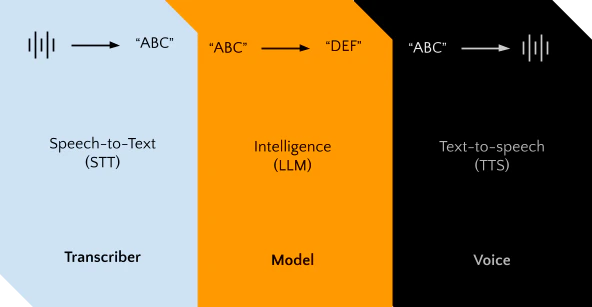
1. Listen (Intake Raw Audio)
When a person speaks, the client device (laptop, phone, etc.) records raw audio (1’s & 0’s at its core). This raw audio must either:- Be transcribed on the client device, or
- Be sent to a server to convert it into text.
2. Run an LLM
The transcribed text is then fed into a prompt and run through a Large Language Model (LLM). The LLM acts as the core intelligence that simulates a human behind the scenes.3. Speak (Text → Raw Audio)
The LLM outputs text, which must now be spoken. The text is converted into raw audio (again, 1’s & 0’s), which is playable on the user’s device. This process can happen:- Directly on the user’s device, or
- On a server, which sends the audio back to the client.
Indigenius orchestrates all these steps, ensuring a smooth and responsive conversation, while providing a simple set of tools to manage these internal processes.
Orchestration Models
Indigenius runs real-time models on top of STT, LLM, and TTS. It also provides extra capabilities on top of the core models, including latency optimization and seamless streaming.High-Level Architecture Overview
| Module | Function | Notes |
|---|---|---|
| Listen (STT) | Intake and transcribe raw audio from user devices | Can be local or server-side |
| LLM | Process text and generate conversational responses | Acts as the “intelligence” behind the conversation |
| Speak (TTS) | Convert LLM output into raw audio for playback | Can happen locally or via server; optimized for low latency |
| Orchestration | Coordinates the flow between STT, LLM, and TTS | Handles scaling, streaming, and latency optimization |
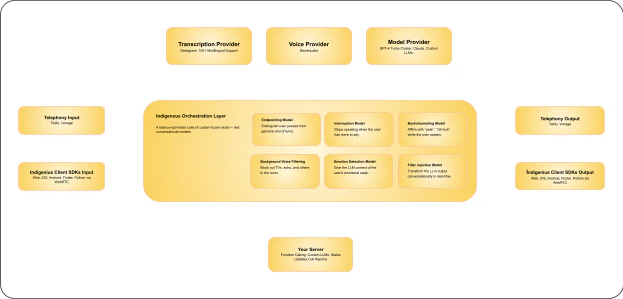
Indigenius also runs a suite of audio and text models that make its STT → LLM → TTS pipeline feel natural and human-like. This orchestration ensures real-time performance, low latency, and a seamless conversation experience. Here is a high level pictogram of the AgentPro architecture:
Overview
The following are the models we currently run, with many more coming soon:- Endpointing – Detects exactly when the user finishes speaking.
- Interruptions – Lets users cut in and interrupt the assistant.
- Background noise filtering – Cleans up ambient noise in real-time.
- Background voice filtering – Ignores speech from TVs, echoes, or other people.
- Backchanneling – Adds affirmations like “yeah” or “got it” at the right moments.
- Emotion detection – Detects user tone and passes emotion to the LLM.
- Filler injection – Adds “um”, “like”, “so” and other natural fillers to agent responses.
Endpointing
Endpointing determines when the user is done speaking. Traditional methods rely on silence detection with a timeout. Unfortunately, if we want sub-second response times, that approach is insufficient. Indigenius uses a custom fusion audio-text model to detect when a user has completed their turn. Based on both the user’s tone and what they’re saying, it decides the pause length before sending the input to the LLM. This ensures users are not interrupted mid-thought while still providing fast responses once they are done speaking.Interruptions (Barge-in)
Interruptions (also called Barge-in) allow the system to detect when a user wants to interrupt the agent’s speech. Indigenius uses a custom model to distinguish between:- True interruptions, e.g., “stop”, “hold up”, “that’s not what I mean”
- Non-interruptions, e.g., “yeah”, “oh gatcha”, “okay”
Background Noise Filtering
Many models, including the transcriber, rely on audio input. Real-world sounds like music or car horns can interfere with performance. Background noise filtering removes these distractions in real-time.Background Voice Filtering
Transcription models pick up all speech-like sounds, which can include TVs or echoes. Background voice filtering focuses on the primary speaker while ignoring all other voices, ensuring accurate conversation flow.Backchanneling
Humans naturally provide feedback like “yeah”, “uh-huh”, or “got it” while others speak. These backchannel cues affirm the speaker without interrupting them. Indigenius uses a fusion audio-text model to:- Detect the best moments to provide backchanneling
- Choose the appropriate affirmation
Emotion Detection
How something is said is often as important as what is said. Indigenius trains a real-time audio model to detect emotional inflection. This emotion data is passed to the LLM, allowing the agent to respond differently if the user is angry, annoyed, or confused.Filler Injection
LLM outputs tend to be formal, not conversational. People naturally use fillers like “umm”, “ahh”, “I mean”, “like”, and “so”. To maintain natural conversation without adding latency:- Indigenius built a custom real-time model
- Converts streaming output into natural conversational speech